Multiple Computers, One Mouse?

IncomeSlayer

Banned
Jul 16, 2009
74
0
0
Ok so i just got a new lap top and i have 3 screens so naturally i want to drag my mouse to the 4th screen (laptop) is there any hardware that will allow you to do this .

I'm pretty sure i saw this some were here in the past .. then again it could been dreaming


Yes there is a way how to do it... I know it sounds a bit crazy but trust me, it works:

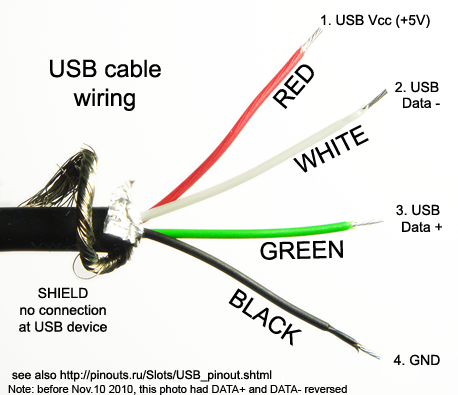
Connect a 20 - 25 (guage should be fine) wire to the white wire of you usb mouse
USB-cable-wiring.png


Then take that wire and make five hoops with it (yes I am serious) and ground the wire to the black wire.

Now this is the fun part, take some aluminum foil and create a curved pocket, put this aside as it will come in handy later.

Now take a bolt,screw of some sorts (about the size of a aaa battery) and position it in the middle of the hoops you have made, then take a tan colored wire (color is very important) and loop it around the nut/bolt you have attached (you need about 10 loops) then take the wire and connected to the LAN/network port of your laptop (dose not matter what pin)... now take the aluminum curved pocket and put it ontop of your head (this helps with the reception and cuts back on interference... .you are ready to go

 
Yes there is a way how to do it... I know it sounds a bit crazy but trust me, it works:

Connect a 20 - 25 (guage should be fine) wire to the white wire of you usb mouse
USB-cable-wiring.png


Then take that wire and make five hoops with it (yes I am serious) and ground the wire to the black wire.

Now this is the fun part, take some aluminum foil and create a curved pocket, put this aside as it will come in handy later.

Now take a bolt,screw of some sorts (about the size of a aaa battery) and position it in the middle of the hoops you have made, then take a tan colored wire (color is very important) and loop it around the nut/bolt you have attached (you need about 10 loops) then take the wire and connected to the LAN/network port of your laptop (dose not matter what pin)... now take the aluminum curved pocket and put it ontop of your head (this helps with the reception and cuts back on interference... .you are ready to go

You forgot the most important step!

You also need to run leads off the red and green wires and then attach alligator clips to each end of each wires. firmly clasp those alligator clips to your right and left testicles, if you have no balls which is probably the case, clasp to nipples! This grounds out the whole mind cap to computer thingy for safe operation.

Post pictures we would like to monitor your progress.
 
Yes for increased performance and faster mouse acceleration take a wire and shove it in your ass (this really works)

OsamaDonkey.jpg
 
Yes there is a way how to do it... I know it sounds a bit crazy but trust me, it works:

Connect a 20 - 25 (guage should be fine) wire to the white wire of you usb mouse
USB-cable-wiring.png


Then take that wire and make five hoops with it (yes I am serious) and ground the wire to the black wire.

Now this is the fun part, take some aluminum foil and create a curved pocket, put this aside as it will come in handy later.

Now take a bolt,screw of some sorts (about the size of a aaa battery) and position it in the middle of the hoops you have made, then take a tan colored wire (color is very important) and loop it around the nut/bolt you have attached (you need about 10 loops) then take the wire and connected to the LAN/network port of your laptop (dose not matter what pin)... now take the aluminum curved pocket and put it ontop of your head (this helps with the reception and cuts back on interference... .you are ready to go

Impressive bullshitting. You had me for about 10 seconds.
 
if you're using windows add 'ditto' to the mix so you can share clipboards (and keep multiple items on the clipboard)... might have a linux version, dunno...
 
Why not just get an extra monitor and use it, saving the the other pc's life (and the life of the laptop lcds are not as long as monitors + replacement cost is higher) and it is sooo much faster
08022009kEbFrB4.jpg
 
synergy kicks ass but the UAC on windows 7 will jack your mouse up. So, pretty much anytime you install anything on one of the client computers and the UAC pops you loose total control... not sure how vista reacts...

other than that minor annoyance synergy does the job and is free
 
Ok I got it take two mouses and glue the bitches together or tape them, then get some KY jelly and lubricate them, shove them in the ass and when you fart you can move both mouses at the same time