Cygwin + PuTTY = frustration

roman8389

Banned
Oct 9, 2009
189
1
0
So I'm trying to use Cygwin and PuTTY to create a SOCKS proxy using SSH tunneling...or something. I honestly have no idea what I'm doing; I'm just following directions. I'm following this (Dynamic SOCKS Proxy using PuTTY Random thoughts along the roadside…) and this (Setup an SSH Server in Vista) and something isn't quite working. It looks like everything sets up correctly in Cygwin, but when I try to make the connection with PuTTY, it says either "Connection refused" or "Host doesn't exist."

If anyone knows how to fix this or can give a walkthrough or something, I would be extremely grateful.


I've got that setup on my PC. Are you trying it locally or remotely? Try and connect locally first to make sure your SSH server is setup properly. There could be a whole bundle of reasons why you're getting that error in Putty - Firewall permissions, wrong settings etc. Post a screenshot of your Putty settings screen as well, otherwise no one will have a clue what you've done wrong.
 
For anyone curious on SSH Tunneling with a mac

1) Open Terminal
2) ssh username@server -D 9999
3) System Preferences -> Network -> Advanced -> Proxies
4) SOCKS proxy to 127.0.0.1 port 9999 -> Click OK
5) Safari is now browsing thru your server.

And you just ctrl+c or close terminal to stop the proxy (but you'll need to turn off Proxies in system preferences, or all sites will appear dead)
 
I'm using cygwin because that's what I read was needed to use OpenSSH which, to my understanding, is what creates the necessary SSH connection for the proxy. I'm assuming I'm wrong about this though.

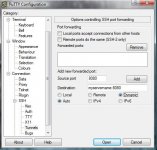
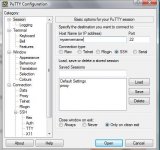
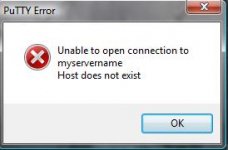
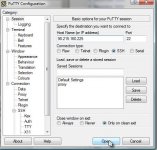
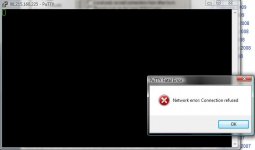
Here's some shots. Following the walkthrough above, I configure the Tunnel tab (shot 1) and hit Add, then do the Session tab (shot 2) like it says, and I get a "host not found" error (shot 3). I found another walkthrough (Use PuTTY as a secure proxy on Windows | IT Security | TechRepublic.com) and I try to do what it says, configuring the Tunnel tab as in shot 2, but leaving the Destination line blank. Instead of "myservername" on the Session tab, I put in my IP (shot 4, no hax plz). I hit Open and get a "connection refused" error (shot 5). The command-prompt-looking screen doesn't appear when I use the first walkthrough; only the second.

Any ideas? I appreciate any help.
 

Attachments

  • putty1.jpg
    putty1.jpg
    38.9 KB · Views: 2
  • putty2.jpg
    putty2.jpg
    43.5 KB · Views: 1
  • putty3.jpg
    putty3.jpg
    9.4 KB · Views: 1
  • putty5.jpg
    putty5.jpg
    45 KB · Views: 1
  • putty6.jpg
    putty6.jpg
    22.4 KB · Views: 1
Well if you are getting a connection refused on port 22, perhaps shell is not configured on port 22 (knownhost for example has it on 2200). Or worse yet, your hosting provider does not give you shell access.

However 98.215.160.225 resolves to "c-98-215-160-225.hsd1.il.comcast.net"

Are you trying to connect to yourself? And if so do you even have an SSH Server running on your computer. I think you needed to enter a IP of your server, not your local machine. (tunneling thru your local machine is pointless)

Also its obvious "myservername" won't be found cuz the instructions are not meant to be taken literally (you're supposed to substitute it with your server's domain or IP, ie: a remote machine you want to tunnel). I hate to say it but you don't have enough knowledge to pull it off if you can't figure that out.
 

This would work fine, just use an IP/domain name of a server you have with a hosting provider that allows shell access. (most VPS hosting do, just don't go over your bandwidth quota).

If you don't have one, ZenSix (owned by Subigo above) , has Unmanaged VPSes starting at 12.95/month above, which would at the very least without any configuration on the server itself, allow ssh tunneling. Just keep in mind there's a 300GB/month quota on that plan. (or pick Zen-Nano for 6.99/month, not much ram or space, but has same amount of bandwidth if you only plan on using it for a secure proxy https://zensix.com/clients/cart.php?gid=9 )
 
If I'm not wrong, I believe that was the point of Cygwin: to create an SSH server on my system, which Putty then connects to. I'm going to assume that a $10/month hosting package with Hostgator doesn't have shell access?
 
If I'm not wrong, I believe that was the point of Cygwin: to create an SSH server on my system, which Putty then connects to. I'm going to assume that a $10/month hosting package with Hostgator doesn't have shell access?

Hostgator, absolutely not. Shared hosting won't give you root access or shell access 99.99% of the time.

Also running an SSH server on your system is pointless, the IP visible to the sites you visit would be exactly the same as if you were not using the proxy and communication coming from your machine to the internet provider would still remain unencrypted... and what would be the point of that?

So if you're seriously in need of a secure connection from your machine to the secure server, consider the Zen-Nano package from ZenSix, it won't be much space/ram for hosting any serious sites (though technically shared hosting isn't either :D), but it'll do just fine as an SSH tunnel with the default login information provided in email, if you're just browsing the web, thats 300 gigabytes of bandwidth total to use per month. (traffic up to the server, and out of the server to the sites ,is also counted as used bandwidth FYI)
 
Thanks for the help. I'm not in need of a secure/encrypted connection at all; I just need a proxy service that is non-web-based (e.g., not going to lolfreeproxy.com for access).
 
...

Well, I feel like a huge idiot. That took all of 2 minutes; whatismyip.com confirms that my IP is different.

+rep...
 
And if you haven't already, turn off the bullshit windows firewall; doing this will solve at least half of any given network problems.
 
Hey kblessingr, i tried the Mac SSH thing you wrote, Cool. It works....
But why does it only work with Safari and not FireFox ?